


In short
A conveyancing CRM looks after the stage before the file opens: the quote request, the quote, the chasing and the instruction. It should hold each enquiry's matter type and status, let your team amend and resend a quote quickly, and hand on leads who haven't instructed.
We built a CRM like this for UK conveyancing firms. The firm edits lead data, amends a quote and resends it, and the firm owns the system.
This guide is for partners, heads of residential property and practice managers at SRA-regulated firms. It covers what to ask of the software that handles quote requests. That is often not the case management system. It isn't a review of case management products.
How is a conveyancing CRM different from case management software?
A CRM tracks people before they instruct you. Case management software runs the matter after they do. The CRM holds the quote request, the quote you sent, the follow-up and the outcome. The case system holds the file, the searches and completion.
Some products do both, and some firms run two. Others run neither for the quote stage and use a shared inbox or a spreadsheet. This guide is about the quote stage, whichever system covers it. For the wider enquiry process across practice areas, see intake and CRM for solicitors.
Which system does which job. Some products do both jobs, but the jobs stay separate.
| Job | CRM for the quote stage | Case management software |
|---|---|---|
| Starts before the client instructs you | Yes | No |
| Holds the quote you sent and the follow-up | Yes | No |
| Lets staff amend and resend a quote quickly | Yes | No |
| Holds the file, the searches and completion | No | Yes |
What is conveyancing lead management software?
Conveyancing lead management software is a CRM for the quote stage. It holds each enquiry, the quote sent and its status until the lead instructs or declines.
Judge any product on three jobs: recording the enquiry, amending and resending a quote quickly, and following up leads who haven't instructed. The sections below cover each one. Our conveyancing quote software page shows the whole system in one place.
What should a CRM record when a quote request arrives?
It should record who asked, what for and where they came from, in one place. Six fields cover most of it:
- Name, phone, email and how the person asked to be contacted
- Matter type: purchase, sale, sale and purchase, or remortgage
- The property details your quote depends on, such as price and whether it is leasehold
- Where the enquiry came from: your website, an ad, a referrer or a call
- What the person agreed to hear from you, and when
- The quote you sent, the date, and who sent it
Lead source is the easiest field to skip. Without it you can't say which pages or ads bring instructions rather than enquiries. Our page for conveyancing firms shows why that split matters for what each source earns.
Why does it matter how fast you can amend and resend a quote?
The first quote is often not the last one. People change the price, add a leasehold flat, or ask for a sale and a purchase together. The longer an amended quote takes, the more time the person has to ask another firm.
Four checks show how your current setup copes:
- Can a member of the team edit the lead's details without a developer?
- Does the quote change when the details change, or do you retype it?
- Can you resend it by email and by text from the same screen?
- Is the earlier quote still on the record, with its date?
The SRA Transparency Rules ask firms advertising residential conveyancing to publish the total cost of the service. Where that isn't practicable, they publish the average cost or range of costs.[1] Keep what the CRM sends in line with what your site says. The SRA price and complaints checklist lists the items.
What goes into a conveyancing quote?
Most quotes have three common sections:
- Government charges
- Legal fees
- Disbursements
The firm's own fees sit under them, and those depend on how the firm runs and which fees apply to that lead.
Government charges such as Stamp Duty Land Tax and HM Land Registry fees are set by government, so the quote should show them as their own lines.
GOV.UK explains Stamp Duty Land Tax, which applies to purchases over a set price in England and Northern Ireland.[6] It also publishes the HM Land Registry registration fees.[7] A CRM that stores the property price and matter type can feed these lines without retyping.
How should a CRM handle each matter type?
Give each matter type its own fields, because the quote depends on different facts. The table below is a starting list of fields, not a pricing model. Your fee structure decides what you collect.
| Matter type | What the quote may depend on | What to keep on the record |
|---|---|---|
| Purchase | Price, freehold or leasehold, whether a mortgage is involved | Price, tenure, lender if any, target date |
| Sale | Price, freehold or leasehold, any mortgage to repay | Price, tenure, current lender, target date |
| Sale and purchase | Both of the above | One lead linked to two matters, so one quote can cover both |
| Remortgage | Property value, current and new lender | Value, both lenders, target date |
Which lead statuses does a conveyancing CRM need?
Few. A status is there to tell the team who has to do what next. Five cover the quote stage, as the figure shows.
- New requestMatter type and source recorded
- QuotedQuote sent, with a date and an owner
- ChasingNext date set; quote amended and resent if details change
- InstructedThe matter moves to your case management system
- In nurture, or closedReason recorded; follow-up emails if the person agreed
The first three statuses each carry an owner and a next date.
Chasing matters because poor communication and delay made up 47% of the complaint types the Legal Ombudsman accepted in the third quarter of 2025/26, across all areas of law.[2] Residential conveyancing was the most complained-about area of law that quarter, with 647 complaints, 36% of those accepted.[3]
A dated record of who said what to whom shows what the client was told, and when.
What should happen to leads that don't instruct?
They shouldn't vanish. In our view, conveyancing leads are hard to convert because of property chains, and because many people aren't ready yet and are only comparing quotes. More chances to stay in front of a lead means a better chance they instruct.
The CRM should move them into follow-up, with their matter type, location and last action stored so the emails can use them. We describe how a six-month version works without spamming in our guide to conveyancing lead nurture emails.
The ICO's guide to PECR says marketing emails to individuals need their specific consent or the soft opt-in, which can cover someone who asked you for a quote.[4] Every message must also give a valid contact address so people can opt out or unsubscribe.[5]
What should a conveyancing CRM connect to and report on?
It should connect to the places quote requests arrive and to the system that opens the file. Then it should report on the quote stage, which a case system rarely does.
- In: your website form, ad lead forms, comparison-site leads and calls your team logs by hand
- Out: quote emails and texts, and the handover to your case management system when someone instructs
- Reports: enquiries and instructions by source, time to the first quote, and the reason each lead was lost
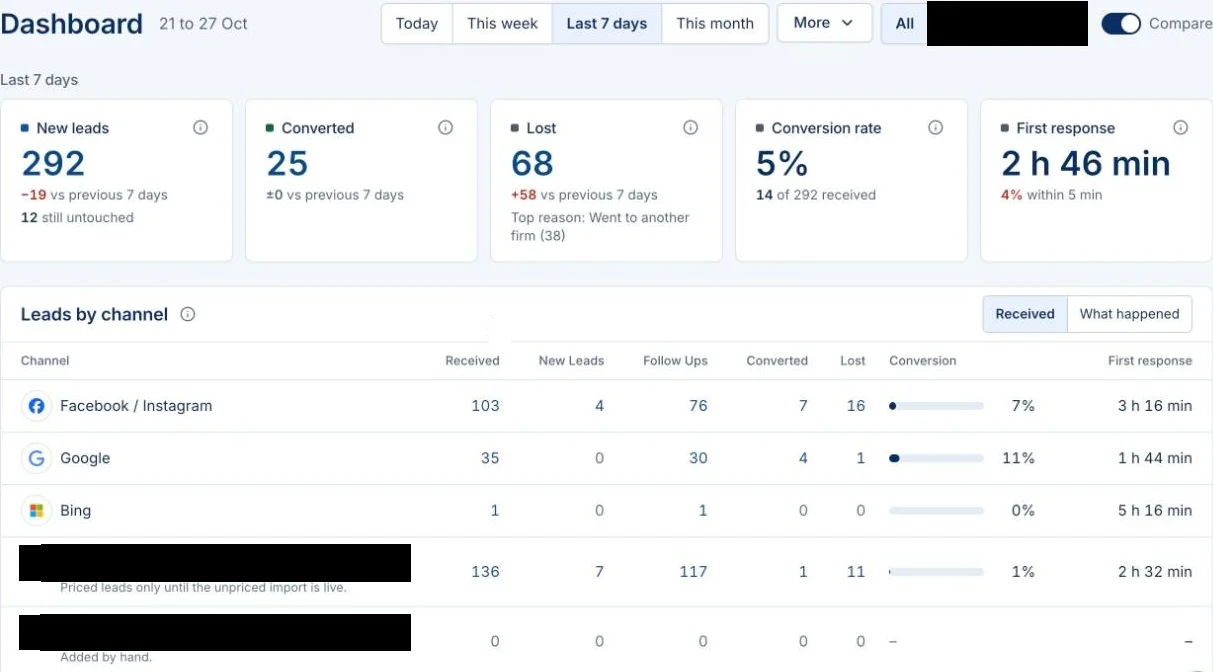
The dashboard further down shows the shape: new leads, conversions, lost leads and leads by channel. Ask any supplier to show you the same four views on your own data, not a demo set. Our guide to conveyancing leads and panels shows why the source split decides which channel is worth paying for.
Who should own the CRM and the data?
Your firm should. Check four things before you sign anything.
- Can you export every lead and every quote?
- Is the account in your firm's name?
- What happens to the data if you leave?
- Who else at the supplier can see it?
If someone else owns the CRM, switching costs you your quote history.
What CRM did we build for conveyancing firms?
We built a custom CRM for UK conveyancing firms. The firm can edit lead data, amend a quote quickly and resend it. It is one part of a larger system, and it is the part the firm's team uses every day. That team no longer writes quotes by hand.
The rest of the system works like this:
- A landing page collects each enquiry.
- The quote goes out within seconds as a personalised email, then a text message and a branded PDF brochure.
- Landing-page leads who haven't instructed get six months of follow-up emails. Compare My Move leads get only the first quote.
The case study has the full build.
The firm owns everything: the landing page, the CRM, the ad accounts and its own accounts. Enquirers give consent on the form, every email carries an unsubscribe link, and the setup follows the UK GDPR and PECR rules set out in the ICO's guide.[4] The full system is on our conveyancing quote software page, and the free quote builder shows what a lead would receive.
One firm's result. From 2 September to 26 October 2026, the CRM we built for a conveyancing firm held 1,238 leads and recorded 66 instructions. Staff mark an instruction by hand. Of the leads received from 1 to 26 October, the CRM marks 62 as instructed.
The firm's own count for 1 to 26 October is 101 clients, so the CRM misses some instructions. If marking a lead as instructed is a separate job, some get missed, so every cost per instruction looks worse than it is.
These are one firm's figures. Results vary by firm, area and market, and we don't present them as an average or a promise. The case study sets out what was built.
Not every firm needs a custom build. If your case system already does the jobs above, improve what you have. For the lead flow around it, see lead generation and local SEO and AI search.
Questions firms ask about a conveyancing CRM
Do we need a CRM if we already have case management software?
Not always. If your case system already logs each quote request, shows its status and lets you amend and resend a quote quickly, it may be enough. If those jobs happen in an inbox or a spreadsheet, a CRM for the quote stage is worth a look.
Can leads from a comparison site go into the same system?
Yes, for the quote. In the system we built, leads from Compare My Move, a quote comparison platform, and leads from the firm's own landing page go through the same quote generation. Compare My Move leads get only that first quote and never enter the follow-up emails.
Time your own quote in 20 minutes
Do this today, with your own system and no help from us.
- Open last week's quote request in whatever system holds it.
- Change one detail, such as freehold to leasehold, or add a second matter.
- Produce the amended quote and send it to a test address. Time the whole job.
- Note how many systems and people it took.
- Check that the lead's record now shows the new quote and a next date.
- List every step that happened outside the CRM. Those are your gaps.
If the job took more than a few minutes, the quote stage is where your next fix should go.
Sources
- Solicitors Regulation Authority, "SRA Transparency Rules", price information for residential conveyancing, sra.org.uk/solicitors/standards-regulations/transparency-rules. Checked 20 October 2026.
- Legal Ombudsman, "2025/26 Quarter 3 complaints data", Q3 at a glance, complaint types, legalombudsman.org.uk (Q3 2025/26 complaints data). The figure covers all areas of law. Checked 20 October 2026.
- Same data, complaints by area of law, legalombudsman.org.uk (Q3 2025/26 complaints data). Checked 20 October 2026.
- Information Commissioner's Office, "Electronic mail marketing", Guide to PECR, regulation 22, consent and the soft opt-in, ico.org.uk (electronic mail marketing). The ICO notes this guidance is under review after the Data (Use and Access) Act. Checked 20 October 2026.
- Same guide, opting out of marketing messages, ico.org.uk (electronic mail marketing). Checked 20 October 2026.
- GOV.UK, "Stamp Duty Land Tax", overview, gov.uk/stamp-duty-land-tax. Checked 20 October 2026.
- GOV.UK, HM Land Registry, "Registration Services fees", gov.uk/guidance/hm-land-registry-registration-services-fees. Checked 20 October 2026.